In this guide
The useful part, up front
- Follow relevant sellers to build a product research queue.
- A newly observed ASIN is a lead, not proof of sales or profit.
- Check the product, source, restrictions, and costs before buying.
Start with a seller, then investigate the products
Amazon storefront stalking is a sourcing workflow: you review a seller’s product assortment, watch for additions, and investigate items that could fit your own business. Instead of starting every research session with a blank search box, you start with a seller whose range is relevant to you.
The useful output is a shortlist of questions. Can you find the exact item from a suitable source? Can your account sell it? Do the current economics work? Another seller’s listing gives you a place to investigate; it does not answer those questions for you. A focused watchlist makes this process easier to repeat without turning every product into an assumed opportunity.
Understand the seller ID and the ASIN
You monitor a seller using its Amazon seller ID. You research a product using its ASIN. Amazon defines an ASIN as a unique, ten-character product identifier; it can appear after /dp/ in a product-page URL or in the product details. These identifiers serve different purposes, so copying a product ASIN into the Add seller form will not identify the seller you want.
A seller can offer many products, and an existing Amazon product page can have offers from different sellers. Consequently, a newly observed ASIN on a watched seller’s list does not mean that Amazon just created the product page. It means the product is new to the comparison being made.
Find an Amazon seller ID
Copy the web address of an Amazon.com seller profile or storefront and paste it below. Starting on a product page? Follow the three steps to reach the right seller.
Amazon seller ID finder
Paste a U.S. Amazon seller profile or storefront link. The finder runs in your browser.
Find Sold by on the product page
On an Amazon.com product page, look in the purchase box for Sold by and open the seller name. The Ships from row tells you who fulfills the order. If you want a different seller, look for Other sellers on Amazon and check the offer there.
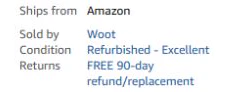
On this Amazon listing, Woot is the seller and Amazon ships the order. Open the seller’s storefront
On the seller profile, choose the storefront link. If you already have the profile address, you can paste it into the finder now.

Amazon’s seller profile for Woot links to its storefront. Copy the address and pull out the ID
The seller ID follows seller= on a profile or me= on a storefront. Both links below identify the same seller. Extra query parameters can appear in the address. Paste the full address into the finder, then copy the ID into Add seller in Sentry.
- Seller profile
amazon.com/sp?seller=A1KWJVS57NX03I- Seller storefront
amazon.com/s?me=A1KWJVS57NX03I
How the workflow looks in Storefront Sentry
Sentry uses seller data supplied by Keepa to compare the ASIN list it receives with its stored list. It records newly observed products and can send discoveries to your saved Discord webhook. Availability and detection timing depend on upstream data, successful checks, and successful delivery. This is monitoring over time, rather than a guaranteed live view of every offer.
Choose a relevant seller
Open its Amazon seller page, find the seller ID in the URL, and keep a note of why its assortment interests you.
Add it to your watchlist
In the dashboard, choose Add seller, enter the Amazon seller ID, optionally give it a recognizable name, and select Start tracking this storefront.
Review discoveries and delivery separately
Use Product discoveries for recorded finds. Use your alert connection and Recent alert delivery to check whether notifications are reaching Discord.
Read the evidence behind each discovery
The discovery time tells you when Sentry recorded the find. Last checked tells you about the recorded seller check. Neither proves the precise moment a seller added stock. Likewise, a recorded product count is a monitoring observation, not a count of units sold or units available for you to buy.
Treat a recorded price as a research reference. Sentry’s saved discovery price comes from Keepa’s Amazon price history and is not necessarily the watched seller’s offer or the Buy Box price. Open Amazon to check the current item, variation, pack size, condition, price, and seller. Missing images, prices, or other metadata should remain unknown until you verify them.
Turn one alert into a decision
Begin by matching the exact product at a potential source. A similar photo or brand name is not enough: confirm the model, size, quantity, and condition. Check whether your own Amazon account can list it and what documentation or approval may be required. Another seller’s access does not establish your eligibility.
Then estimate the costs for your intended fulfillment method, including purchase cost, selling fees, preparation, shipping, and other relevant expenses. Amazon’s pricing resources explain the different fee categories. Revisit the current offers and available history before committing money. A lead that fails these checks still has value: record the reason and move on instead of forcing a purchase.
Build a routine you can maintain
Start with a small group of relevant sellers and a dedicated Discord alert channel. Review Product discoveries by seller or date, then keep your research decisions in a spreadsheet or your existing notes. Record the ASIN, source checked, decision, and reason. Sentry does not currently provide a complete sourcing notebook or automated retail-source matching.
At a regular review, keep sellers that produce research you can act on and replace those that consistently fall outside your sourcing options. Judge the watchlist by useful decisions and time spent, alongside any verified purchases and results you record yourself. Filling every available slot is less useful than understanding why each seller belongs there.
Sources & further reading
Product steps reflect Sentry's current interface. External documentation explains the underlying services; it does not establish monitoring speed, seller sales, or sourcing results.
End of field guide / Keep the research yours.